3.2. Web Services
3.2.1. Introduction
SavaPage uses XML-RPC, JSON-RPC and RESTful API for its public Web Services. Both protocols are Open Standard, lightweight and have support for all major programming and scripting languages.
Note
Rate Limiting is applied to unauthorized access and invalid requests.
Note
The range of Web Services will grow upon request. Please tell us if you need extra methods.
3.2.2. XML-RPC
The secure endpoint is:
https://savapage:8632/xmlrpc/v1
3.2.2.1. onetime-auth.createToken
With this method a Trusted Third Party (TTP) acquires a one-time token for Web App user authentication.
The requesting User Name and returned Token must be offered to the Web
App by hidden HTTP POST input names auth_user and auth_token.
The Web App decrypts the token and honours the authentication request if
the offered and encrypted Users match and the token is not expired.
Name |
Type |
Description |
|
|---|---|---|---|
Parameters |
apikey |
string |
The TTP API key as set in the |
username |
string |
The User Name to authenticate. See Login.
User Alias mapping is applied.
|
|
Returns |
token |
string |
The one-time authentication token holding the
encrypted User Name and token creation time.
The expiration criterion in milliseconds is set in the
web-login.ttp.token.expiry-msecs configuration property. |
Note
This method is used by moodle-block_savapage.
Important
TTP Web App Login authentication must be enabled by setting the
web-login.ttp.enable configuration property to Y.
See Config Editor on how to set the configuration properties
web-login.ttp.enable, web-login.ttp.apikey and web-login.ttp.token.expiry-msecs.
<?xml version="1.0"?>
<methodCall>
  <methodName>onetime-auth.createToken</methodName>
  <params>
    <param><value>your-apikey</value></param>
    <param><value>a-userid</value></param>
  </params>
</methodCall>
curl -k -H "content-type:text/xml" https://savapage:8632/xmlrpc/v1 --data @request.xml
<!-- sample response -->
<?xml version="1.0" encoding="UTF-8"?>
<methodResponse xmlns:ex="http://ws.apache.org/xmlrpc/namespaces/extensions">
  <params>
    <param><value>the-onetime-token</value></param>
  </params>
</methodResponse>
<form method="post" action="https://savapage:8632/user?sp-user=a-userid">
  <input type= "hidden" name= "auth_user"  value="a-userid" >
  <input type= "hidden" name= "auth_token" value="the-onetime-token">
  <input type="submit" value="Logon">
</form>
3.2.3. JSON-RPC
3.2.3.1. Introduction
The secure endpoint is:
https://savapage:8632/jsonrpc/v1
The following configuration properties apply:
Configuration property |
Description |
|---|---|
api.jsonrpc.secret-key |
The secret key to be passed as |
api.jsonrpc.ext.ip-addresses-allowed |
A CIDR Set of allowed client IPv4 and/or IPv6 addresses. When void access is denied for all clients. |
See Config Editor on how to set these items.
The sections below discuss the individual methods. All methods default to the same response layout in case of an error.
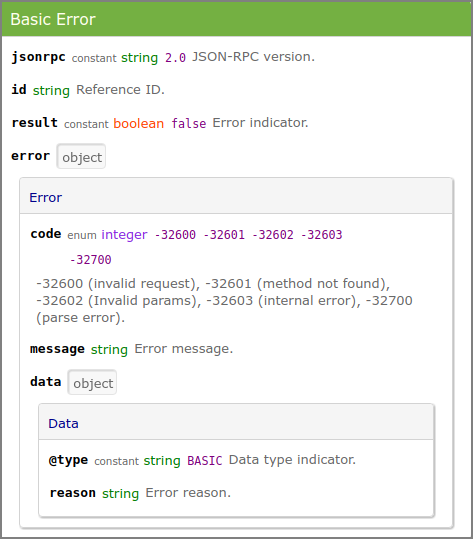
JSON-RPC : Basic Error
3.2.3.2. systemStatus
This method returns the system status as enum value. READY indicates
the system is ready to use and users have access to the Web App. All
other values indicate that user access is denied, because: system
SETUP is needed, MAINTENANCE is in progress, or the system is
temporarily UNAVAILABLE due to running batch jobs (database backup,
user synchronization, database cleanup).
Note
Although the system can have multiple “deny status” at the same time,
the single most important status is returned, in the order SETUP,
MAINTENANCE, UNAVAILABLE.
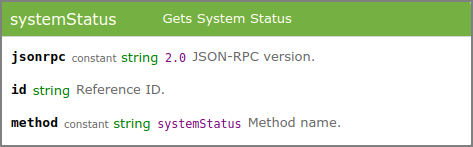
JSON-RPC : systemStatus (request)
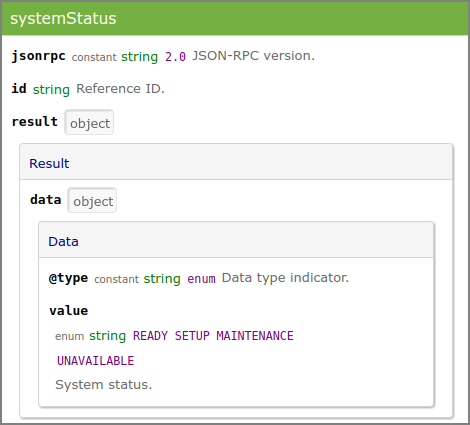
JSON-RPC : systemStatus (response)
curl -k --request POST --header "X-Auth-Key: 7961b5ec-bee4-11e7-8731-406186940c49" \
     --data '{"jsonrpc":"2.0","id":"reference","method":"systemStatus"}' \
     https://savapage:8632/jsonrpc/v1
 {
  "jsonrpc" : "2.0",
  "id" : "reference",
  "result" : {
    "data" : {
      "@type" : "enum",
      "value" : "READY"
    }
  }
}
3.2.3.3. authUserSource
This method authenticates an external user against the configured User Source.
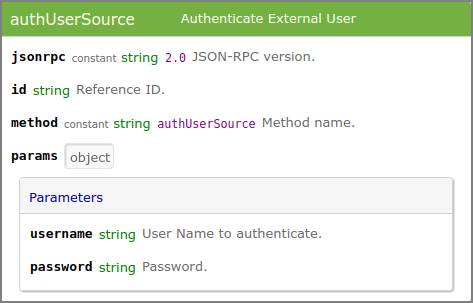
JSON-RPC : authUserSource (request)
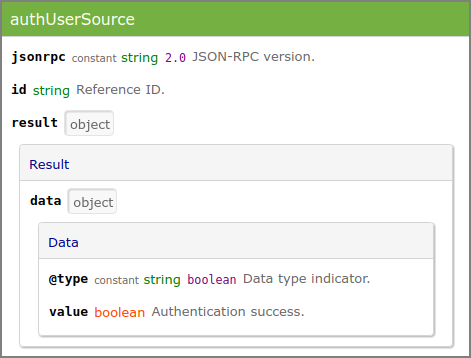
JSON-RPC : authUserSource (response)
curl -k --request POST --header "X-Auth-Key: 7961b5ec-bee4-11e7-8731-406186940c49" \
     --data '{"jsonrpc":"2.0","id":"reference","method":"authUserSource", \
               "params":{"username":"john","password":"AzFi7I"}}'
     https://savapage:8632/jsonrpc/v1
{
  "jsonrpc" : "2.0",
  "id" : "reference",
  "result" : {
    "data" : {
      "@type" : "boolean",
      "value" : true
    }
  }
}
{
  "jsonrpc" : "2.0",
  "id" : "reference",
  "result" : false,
  "error" : {
    "code" : -32603,
    "message" : "ldapserver:636 [No route to host (Host unreachable)]",
    "data" : {
      "@type" : "BASIC",
      "reason" : "ldapserver:636"
    }
  }
}
3.2.4. RESTful API

Note
RESTful Web Services is a Feature Preview that is partly operational and impermanent. The preview is offered to provoke feedback based on real world use. Please tell us your requirements.
The secure endpoint is:
https://savapage:8632/restful/v1
Services are described with curl examples.
3.2.4.1. RESTful Public Services
3.2.4.1.1. GET /system/version
curl -k -X GET "https://savapage:8632/restful/v1/system/version"
SavaPage 1.2.0-rc (Build 20200121)
3.2.4.1.2. GET /tests/http/request
curl -k -X GET \
     "https://savapage.example.com/restful/v1/tests/http/request"
{
  "remoteAddr" : "[2021:661:4cc6:1:5561:96ff:ca11:d4a]",
  "remoteHost" : "[2021:661:4cc6:1:5561:96ff:ca11:d4a]",
  "remotePort" : 53840,
  "localAddr" : "127.0.0.1",
  "serverName" : "savapage.example.com",
  "serverPort" : 443,
  "headers" : {
    "Accept" : "*/*",
    "User-Agent" : "curl/7.47.0",
    "X-Forwarded-Proto" : "https",
    "X-Forwarded-Host" : "savapage.example.com",
    "Connection" : "keep-alive",
    "X-Forwarded-For" : "2021:661:4cc6:1:5561:96ff:ca11:d4a",
    "Host" : "savapage.example.com",
    "X-Forwarded-Server" : "savapage.example.com"
  }
}
3.2.4.2. RESTful Admin Services
Access to Admin Services is controlled by Basic HTTP Authentication.
Configuration property |
Description |
|---|---|
api.restful.auth.username |
Basic Authentication Username. |
api.restful.auth.password |
Basic Authentication Password. |
api.restful.ip-addresses-allowed |
A CIDR Set of allowed client IPv4 and/or IPv6 addresses.
When void access is allowed for all clients.
|
3.2.4.2.1. POST /tests/echo
curl -k -u admin:password -X POST \
     "https://savapage:8632/restful/v1/tests/echo" \
     -H "Content-Type:text/plain" -d "Hello World!"
Hello World!
3.2.4.2.2. GET /documents
# GET JSON info of first 5 documents sorted by creation datetime descending
curl -k -u admin:password -X GET \
     "https://savapage:8632/restful/v1/documents?sort=-created"

# ... sorted ascending
curl -k -u admin:password -X GET \
     "https://savapage:8632/restful/v1/documents?sort=+created"
# GET JSON info of first page chunk of 2 proxy printed documents
# type = all (default) | in | out | pdf | print | ticket

curl -k -u admin:password -X GET \
     "https://savapage:8632/restful/v1/documents?sort=-created&type=print&limit=2&page=0"
[ {
  "id" : 6263,
  "ext_id" : "",
  "type" : "print",
  "title" : "Document A",
  "created" : "2019-09-13T09:18:38+0200",
  "store" : false
}, {
  "id" : 6258,
  "ext_id" : "c5a9dd70e931",
  "type" : "print",
  "title" : "Document B",
  "created" : "2019-09-12T09:49:48+0200",
  "store" : false
} ]
3.2.4.2.3. GET /documents/<id>
# GET JSON info of document id 6272
curl -k -u admin:password -X GET \
     "https://savapage:8632/restful/v1/documents/6272"
{
  "id" : 6272,
  "ext_id" : "d2a3a71c11e9",
  "type" : "print",
  "title" : "Invoice 20190248",
  "created" : "2019-09-16T12:29:15+0200",
  "store" : true
}
3.2.4.2.4. GET /documents/ext_id=<ext_id>
# GET JSON info of document with ext_id d2a3a71c11e9
curl -k -u admin:password -X GET \
     "https://savapage:8632/restful/v1/documents/ext_id=d2a3a71c11e9"
3.2.4.2.5. GET /documents/<id>/pdf
# GET stored PDF document 6272
curl -k -u admin:password -X GET \
     "https://savapage:8632/restful/v1/documents/6272/pdf" > 6272.pdf
3.2.4.2.6. GET /documents/ext_id=<ext_id>/pdf
# GET stored PDF document with ext_id d2a3a71c11e9
curl -k -u admin:password -X GET \
     "https://savapage:8632/restful/v1/documents/ext_id=d2a3a71c11e9/pdf" \
     > d2a3a71c11e9.pdf
3.2.4.2.7. GET /financial/account/balance
# GET JSON info of account balance
# type = USER | GROUP | SHARED

curl -k -u admin:password -X GET \
     "https://savapage:8632/restful/v1/financial/account/balance?type=USER&name=rijk"
{
  "succes" : true,
  "result" : "9.260000"
}
{
  "succes" : false,
  "error" : "error message"
}
See SavaPage Financial.
3.2.4.2.8. POST /financial/account/balance
# Sets or adjusts account balance of an account.
#
# URL parameters (by example):
#
# Mandatory :
#
# type=USER   : USER | GROUP | SHARED
# name=rijk   : identifying name of account
# amount=2.50 : can be negative, like -2.50
#
# Optional:
#
# details=my%20text : transaction details "my text"
# adjust=true       : 'true' creates a transaction to adjust the balance with amount
#                     (a negative amount reduces the balance), 'false' (default)
#                     creates a transaction to set balance to amount

curl -k -u admin:password -X POST \
 "https://savapage:8632/restful/v1/financial/account/balance?type=USER&name=rijk&amount=2.50"
{
  "succes" : true
  "result" : "2.50"
}
{
  "succes" : false,
  "error" : "error message"
}
See SavaPage Financial.
Note
The value of URL parameter details is visible in the transaction
logs. See Transactions
and Account List.
3.2.4.2.9. POST /reports/accounttrx
# POST selection to download Account Transactions of user "rijk"
curl -k -u admin:password -X POST \
     "https://savapage:8632/restful/v1/reports/accounttrx" \
     -H "Content-Type: application/json" \
     -d '{"select":{"account_type":"USER","account_name":"rijk"}}' > AccountTrxList.csv
The POSTed data is a JSON string. See the annotated example below.
{
  "select" : {
    "account_type" : "USER", ①
    "account_name" : "rijk", ②
    "text" : null, ③
    "trx_type" : "PRINT_OUT", ④
    "date_from" : { ⑤
      "ccyy" : 2023,
      "mm" : 1,
      "dd" : 1,
      "zzz" : "+01"
    },
    "date_to" : { ⑥
      "ccyy" : 2023,
      "mm" : 6,
      "dd" : 1,
      "zzz" : "+02"
    }
  },
  "sort" : { ⑦
    "field" : "TRX_DATE", ⑧
    "ascending" : true ⑨
  },
  "media_type" : "CSV" ⑩
}
- 1:
USER | GROUP | SHARED
- 2:
optional for USER (all users), mandatory for GROUP | SHARED
- 3:
(optional) transaction comment snippet
- 4:
(optional) ADJUST | DEPOSIT | GATEWAY | INITIAL | PDF_OUT | PRINT_IN | PRINT_OUT | PURCHASE | TRANSFER | VOUCHER
- 5:
(optional) Sun Jan 01 00:00:00 CET 2023
- 6:
(optional) Thu Jun 01 00:00:00 CEST 2023
- 7:
(optional)
- 8:
TRX_DATE (default) | TRX_TYPE
- 9:
true (default)| false
- 10:
CSV (default) | PDF
Note
The output of this service is identical to the PDF and CSV reports from Transactions.
3.2.4.3. RESTful User Services
Access to User Services is controlled by User ID and UUID.
3.2.4.3.1. POST /documents/print
# Print file "lorem-ipsum.txt" to SavaPage as user "janet" with UUID credentials
curl -v -k -u janet:97008e2c-d8b2-11e9-aa13-406186940c49 \
     -H "Content-Type: multipart/form-data" -H "Accept: application/json" \
     -F "file=@lorem-ipsum.txt" \
      https://savapage:8632/restful/v1/documents/print
You can add a selection of IPP options just like they would be distilled from a driver printed job. See IPP Options from PostScript.
-F "file=@lorem-ipsum.txt" \
-F 'ipp_options={"copies":"2","print-color-mode":"monochrome","sides":"one-sided"}'
Important
A RESTful Print maps to the reserved
Queue /webservice by default.
An alternative non-reserved Queue can be specified by adding an
extra -F parameter, like this:
# Print two collated copies to alternative queue "test"
-F "file=@lorem-ipsum.txt" -F "queue=test"
-F 'ipp_options={"copies":"2","sheet-collate":"collated"}'
If IPP Routing is enabled
for the alternative Queue, the RESTful ipp_options have priority
over and are merged with the IPP Routing options.
To exclusively accept prints from specific IP addresses see Edit Queue.
Note
RESTful Print is used by the SavaPage Android Print App.
3.2.4.3.2. GET /financial/balance
# GET JSON balance of user account "janet"
curl -k -u janet:97008e2c-d8b2-11e9-aa13-406186940c49 -X GET \
     "https://savapage:8632/restful/v1/financial/balance"
{
  "succes" : true,
  "result" : "5.350000"
}
{
  "succes" : false,
  "error" : "error message"
}
See Financial.
3.2.4.3.3. POST /financial/transfer
# Transfers balance amount from user "janet" to "rijk"
curl -k -u janet:97008e2c-d8b2-11e9-aa13-406186940c49 -X POST \
     "https://savapage:8632/restful/v1/financial/transfer?name=rijk&amount=15.00"
{
  "succes" : true,
}
{
  "succes" : false,
  "error" : "error message"
}