14.6. Printing from Android
|
If SavaPage IPP Everywhere
is configured in a Local Network, the corresponding printer
is automatically detected and can directly be used without
any configuration.
|
|
SavaPage Android Print App is a native Android printing service. Users can copy the URL and their credentials from the Internet Printer dialog. The app makes use of RESTful User Services. |


14.6.1. SavaPage Android Print App


Preview
SavaPage Android Print App is a Feature Preview that is fully operational but impermanent. The preview is offered to provoke feedback based on real world use. Please tell us your requirements.
Users can copy the URL and their credentials from the Internet Printer dialog.
The app makes use of RESTful User Services.
To illustrate the App, composite Android screen-shots below show three SavaPage Printers. A tap on a printer entry shows the details for editing.
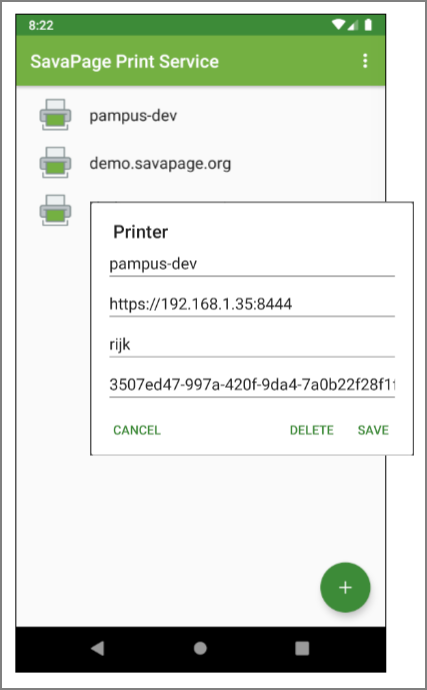
SavaPage Android Print App - Printer List
Printers were added by selecting Add Printer from the top-right menu or by pressing the bottom-right + button. Global Settings were used to trust a self-signed SSL certificate of any SavaPage Printer URL.
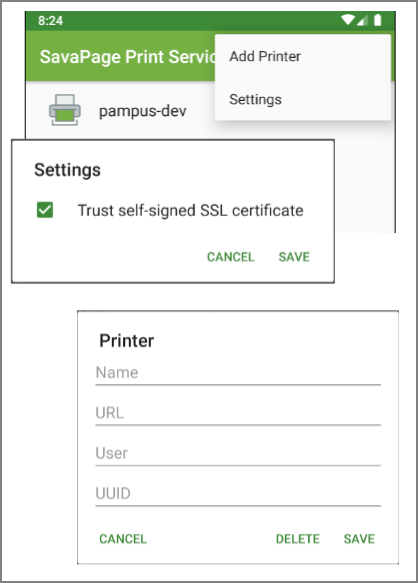
SavaPage Android Print App - Menu
Important
After the SavaPage App is enabled in the “Print services” section of the Settings App, Android Apps that offer Print Services will see the SavaPage printers as target.
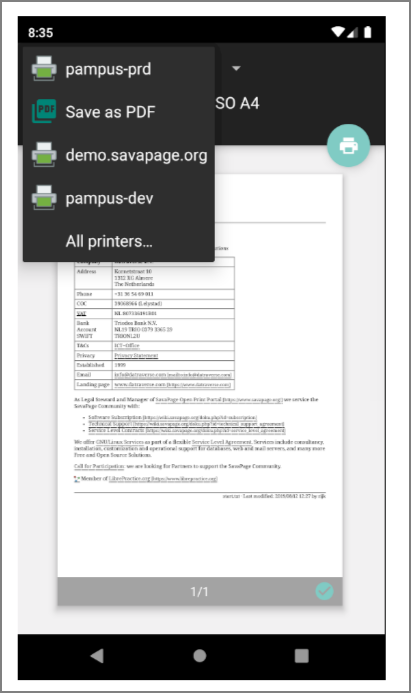
SavaPage Android Print Service