15.2. Single Sign-On Domains
15.2.1. Introduction
In a Single Sign-On (SSO) network user authentication is achieved in a login dialog where the User supplies unique credentials, usually by entering their user name and password [1]. SSO networks establish a web-of-trust between users and domain services. System administrators like SSO domains, because they provide a single interface to control access of Domain Users to servers and services.
Making SavaPage part of an SSO domain is the most sophisticated setup possible. In this way access to the SavaPage queues can be controlled on a domain defined user and group level, and by doing so we can create authenticated queues.
Authenticated SavaPage IPP Print Queues can exclusively be achieved in a macOS or GNU/Linux SSO domain using LDAP or NIS (Network Information Service) as authentication services [2].
Windows Domains have their own rules regarding IPP
Print Queues.
An alternative is to install local printers connected to SavaPage by
the JetDirect/RAW protocol. These RAW IP printers are typically installed
on a Windows Print Server. To exclusively grant access to the SavaPage printer
by the print server, enter the server IP address (as
CIDR) as the allowed client IP address
in the Default / Queue definition. See
Admin Web App: Queue - Edit.
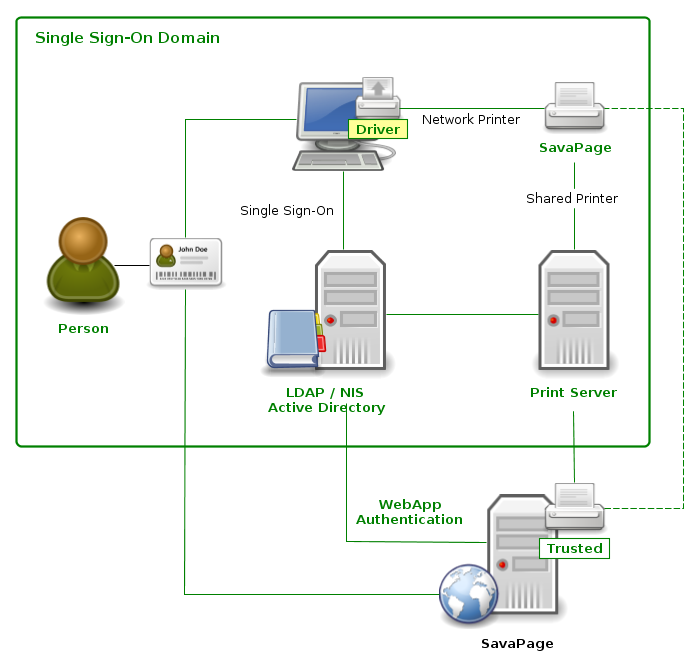
SavaPage in a Single Sign-On Domain
Trust is indeed essential to match the print job with the user’s SafePages as previewed in their authenticated browser session. But, as we shall see in the next section, even in trust relations there are some loopholes to consider, and in networks where access is not fully guarded by SSO, unauthenticated users also need our special attention.
15.2.2. Authentication Loopholes
Although fully closed SSO domains provide unambiguous trust, there are common authentication loopholes that needs to be addressed. These loopholes are generic in nature and not related to SavaPage.
A loophole is introduced when multiple users use the same account (user name) to authenticate to the network. Because the login is based on the person’s role we can not retrieve the unique user identity. If for example, both John and Mary logged in with the generic
studentaccount, there is no way to find out if a SavaPage print job from this session was issued by John or Mary. By default the print jobs of John or Mary will end up in the SafePages of the one and only unknownstudent. In situations where printing content is private this might pose a problem. In SavaPage this loophole can be solved by marking the generic user account as abstract. See Standard IP Based Authentication.A similar loophole is introduced when different users (sequentially) use the same machine, which was started in auto-login mode. Because the login is based on the machine identity we can not retrieve the unique user identity. In SavaPage this loophole is solved by the marking the auto-login user account as abstract. See Standard IP Based Authentication.
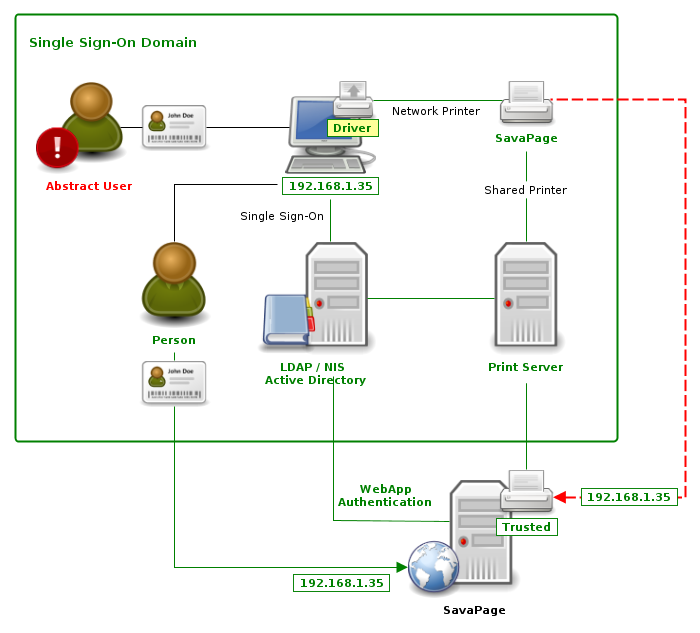
IP Based Authentication for Abstract User
15.2.3. Unauthenticated Users
In networks where access is not fully guarded by SSO, SavaPage queues introduce a security issue when they are used by unauthenticated non-domain users. For example, consider a guest user who connects a personal laptop to the network, and installs and prints to a SavaPage printer. In SavaPage this loophole can be solved by marking the queue as untrusted, i.e. by creating a Public SavaPage Queue. See Standard IP Based Authentication and Basic Authentication. In addition the Internal Users feature can be used to offer out of domain Web App authentication for guest users.
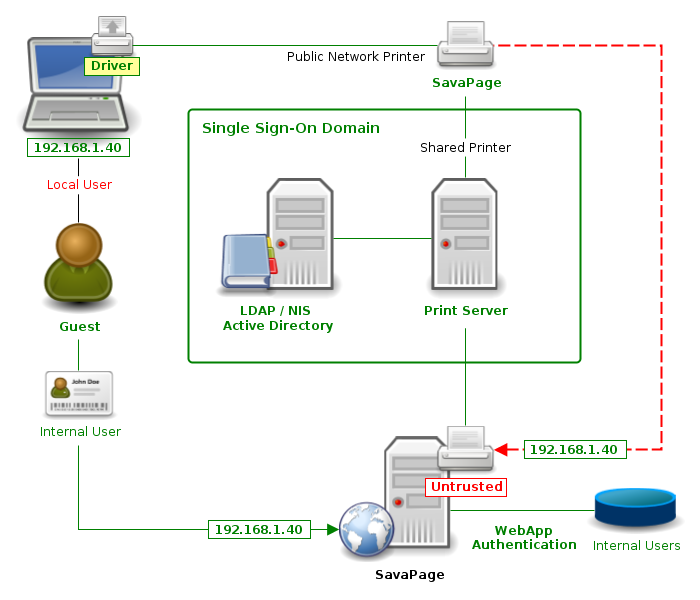
Authentication for Unauthenticated User